03 · Run the show · 4 min
Run the event
Learn the timing controls with a working practice event.
Start, pause, and resume
Start timer begins the current speaker’s countdown. Pause timer holds the remaining time. Select Start timer again to resume. The timer can continue below zero into overtime; it automatically stops at 15 minutes overtime.
Feel what each button does.
Use the actual control room with sample data. Changes stay in the practice tab.
Find it on the screen.
Actual interface · unedited captures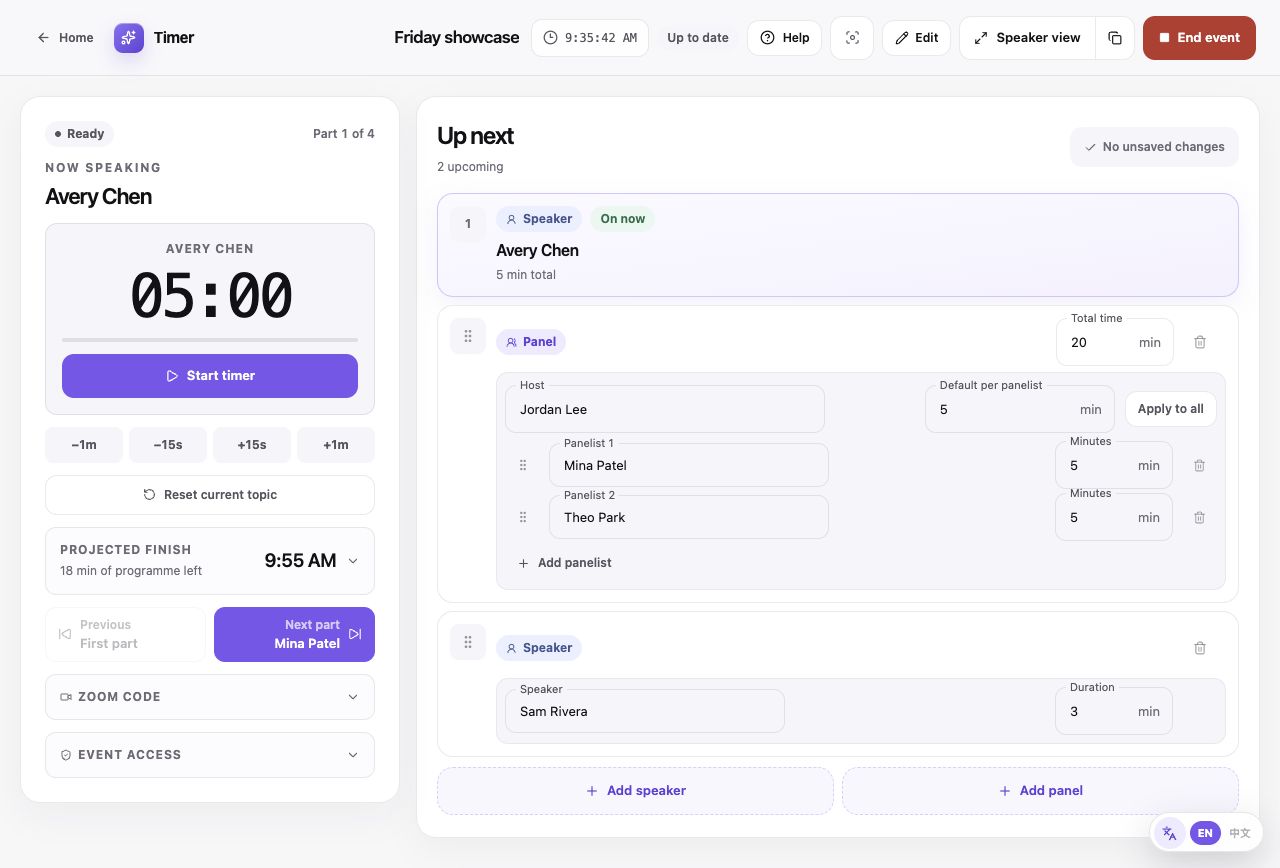
Actual control room with a sample event. Start, adjust, reset, and move to the next speaker here.
Start timer: Begin the current speaker’s countdown. The same button becomes Pause timer.
Read the whole lesson
Start, pause, and resume
Start timer begins the current speaker’s countdown. Pause timer holds the remaining time. Select Start timer again to resume. The timer can continue below zero into overtime; it automatically stops at 15 minutes overtime.
Adjust or reset
−1m and −15s remove time; +15s and +1m add time. A running timer keeps running. Reset current topic asks for confirmation, restores the allotted time, and pauses the speaker; on a panel it also restores the panel total.
Move to another part
Previous and Next part load that speaker with their allotted time, paused. In a panel, Next panelist changes the speaker while a running panel total continues. Skip the rest of the panel moves to the next agenda item.
Control a panel
Starting the speaker also starts a panel total that is not running. Pausing the speaker leaves the panel clock running. Pausing the panel also pauses a running speaker. Use the time adjustments beneath the clock you want to change.
Watch the finish and save state
Expand Projected finish to set a host transition allowance between agenda items. Focus mode hides the run of show. Watch the cloud save status: Offline is not a confirmed cloud save. Other screens need a connection to receive changes.
Finish the event
End event asks for confirmation and marks the event completed. Start event on a completed event returns to the first part, ready for you to start the timer.